FREE LIVE MATERIALS · VISUAL VIBE CODING
A tiger on a bike,
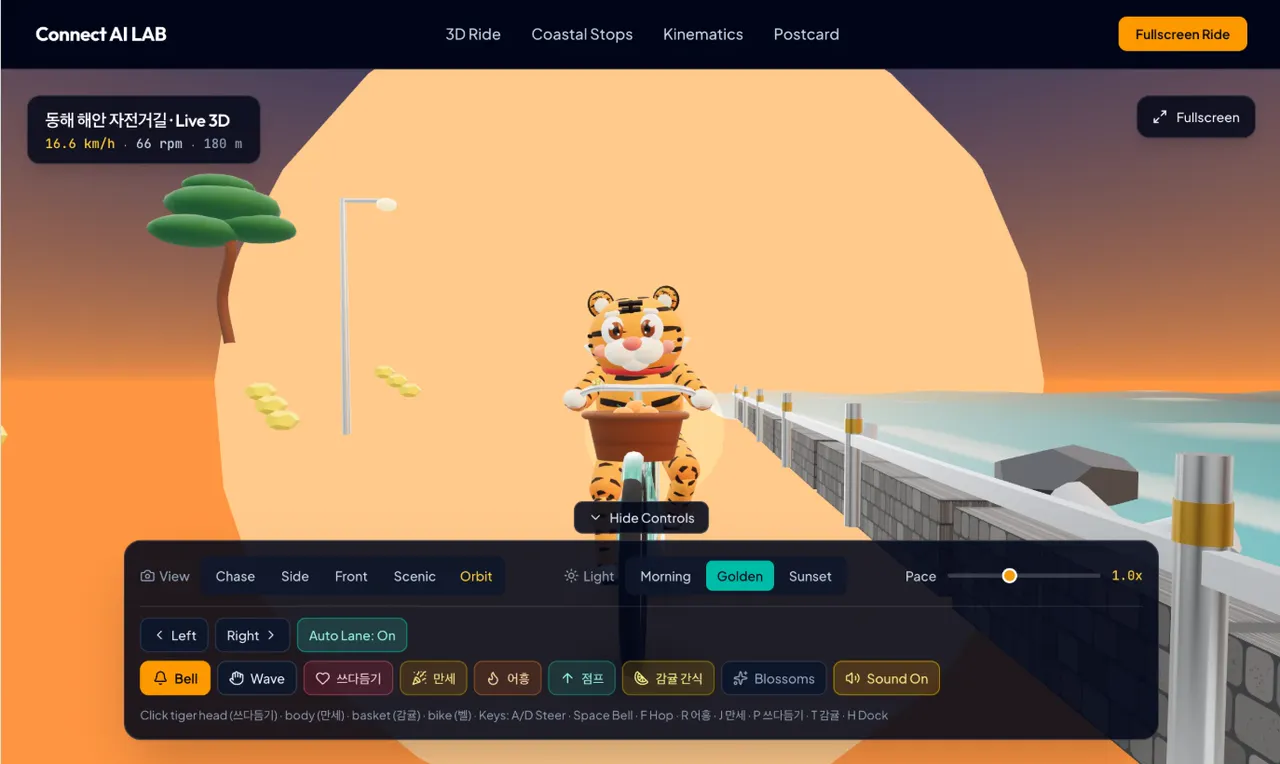
The page after the fourth prompt
A tiger on a bike,
from four prompts
Tonight we build an interactive 3D web page in Google AI Studio: a Korean tiger riding a bicycle along a coastal road. Nothing to install. Copy each prompt, paste it, and watch it get built.
One page you can ride
It runs in the browser with Three.js. This is not a generated video. It is code, so you can keep changing it by asking.
- The tiger really rides. Both feet pedal, the front paws steer, the tail sways, and the wheels turn with the pedals.
- You can drive it. Camera views (Chase, Side, Front, Scenic, Orbit), light (Morning, Golden, Sunset), pace, left and right.
- You can play with it. Ring the bell, wave, pet the tiger's head, make it cheer, roar, jump, or toss the tangerines in the basket.
- It becomes a website. A top menu, sections for the coastal stops, and a full screen ride button.
4PROMPTS
13 min 22 sTOTAL BUILD TIME ON JAY'S RUN
0THINGS TO INSTALL
Open AI Studio
- Go to aistudio.google.com and sign in with a Google account.
- Start a new app. Jay used Gemini 4 Hydrogen.
- Paste the first prompt into the chat box on the left and send it. The preview on the right shows the result when the build finishes.
01
Make the 3D scene
One prompt describes who is in the scene, how it moves, and how far to take it.
ON JAY'S RUN · 6 MIN 29 S · 13 FILES02
Turn it into a website
The scene becomes the top of a real page with a menu and sections.
ON JAY'S RUN · 1 MIN 59 S03
Put your name on it
One short line, and the page carries your brand.
ON JAY'S RUN · 18 S04
Change what you do not like
Say what you see and what you want instead.
ON JAY'S RUN · 4 MIN 36 SWhat we made together
Post what you made and it stacks up here. We will open them one by one on the live.